CW Complete Trainer

USER GUIDE  ·  by HB9HKN  ·  v3.0.35
Get it on Google Play

11Character Training

Character Training uses the Koch method — the same ordering used by LCWO.net. You start with just two characters (K and M) and add one new character at a time as your confidence grows. All 40 CW characters are covered.

Training Mode

Three mutually exclusive modes are available via the mode selector at the top of the screen:

  • Koch default — classic progression through the first N characters of the LCWO order. Tap any chip to jump to that level. Default level: 2 (K, M). Level range: 2 – 40.
  • Selected Characters — pick exactly which characters to practise by tapping individual chips. Useful for targeted drill on specific problem characters regardless of Koch order. The Letters / Numerals / Punctuation quick-select chips add or remove an entire category in one tap — a chip shows as active only once every character in that category is selected.
  • Koch with Exclusions — Koch progression minus individually excluded characters. Advance through the Koch order while skipping characters you want to defer.

Selecting Your Level (Koch mode)

The character set panel shows all 40 characters as chips. Characters at or below your current level are unlocked (filled, tappable); the next character is highlighted; characters above your level are greyed out.

  • Tap any chip to jump directly to that level.
  • The current level is saved and restored when you reopen the app.
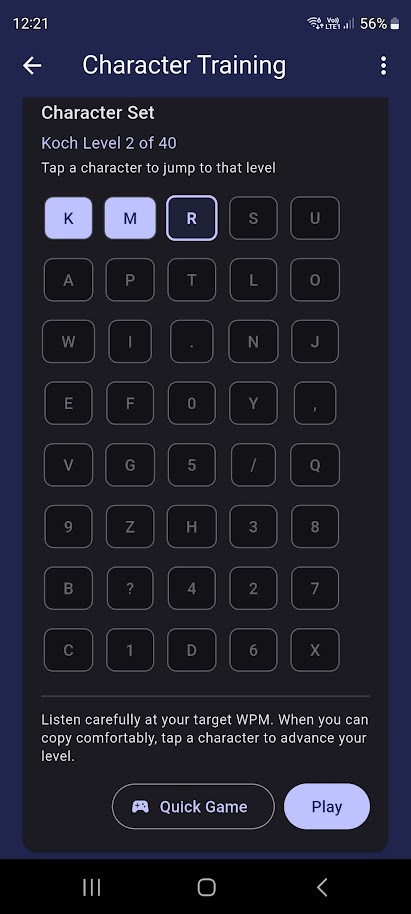
Koch Level Setting

Playing an Exercise

Tap Play to generate a fresh exercise: randomly chosen characters from your current level, transmitted at your configured speed and split into groups for easier copying. Use the Group Size control above the character set (5 or 3 characters per group) to choose the grouping. A VVV opening and --- closing marker are added automatically.

The recommended approach: stay at a level until you can copy at least 90% of characters comfortably, then tap the next chip to advance.

Text-to-Speech (TTS)

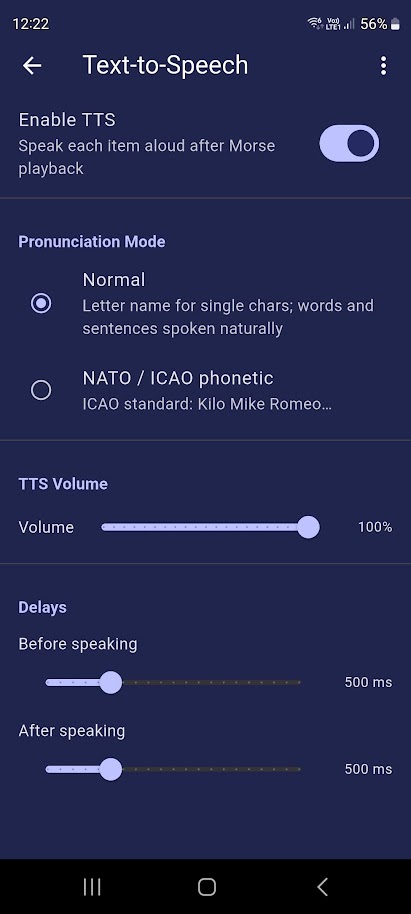
When TTS is enabled (Settings → Text-to-Speech), each character is spoken aloud after its Morse plays, giving you immediate confirmation. Two modes are available:

  • Normal default — letter name spoken naturally ("Kay", "Mike", …)
  • NATO/ICAO — phonetic alphabet ("Kilo", "Mike", "Romeo", …)
Leave TTS on — it's not just a convenience. It's what routes Character Training into the dedicated training screen that only reveals a character's name after you've heard it, so there's no way to read ahead. See I Want to Learn Morse Code Characters for the full recommended setup.

Quick Game

Tap Quick Game to enter the Character Match game — a timed single-character recognition quiz using your current Koch level.

TTS Controls